1Regra principal
Antes de escrever qualquer movimento de câmera, defina a gramática do vídeo. Escolha UMA:
MULTI-CAMERAVários enquadramentos, como vídeo editado.
SINGLE TAKEUma câmera contínua, sem cortes.
ORBITCâmera circulando o sujeito.
DRONEMovimento aéreo, subida, afastamento ou aproximação.
TRACKINGCâmera acompanha o sujeito.
COMMERCIAL / PRODUCTCobertura publicitária de produto.
Nunca comece descrevendo lentes ou movimentos antes de definir isso.
2Estrutura mestre
Use sempre:
PRESERVE→FORMAT→TIMELINE→CAMERA→CONTINUITY→RESTRICTIONS
- PRESERVE — o que não pode mudar.
- FORMAT — que tipo de vídeo será criado.
- TIMELINE — o que acontece em cada trecho.
- CAMERA — ângulo + enquadramento + movimento.
- CONTINUITY — o que deve permanecer conectado.
- RESTRICTIONS — erros que devem ser evitados.
3Template 01 — Multicâmera para pessoa falando
Prompt
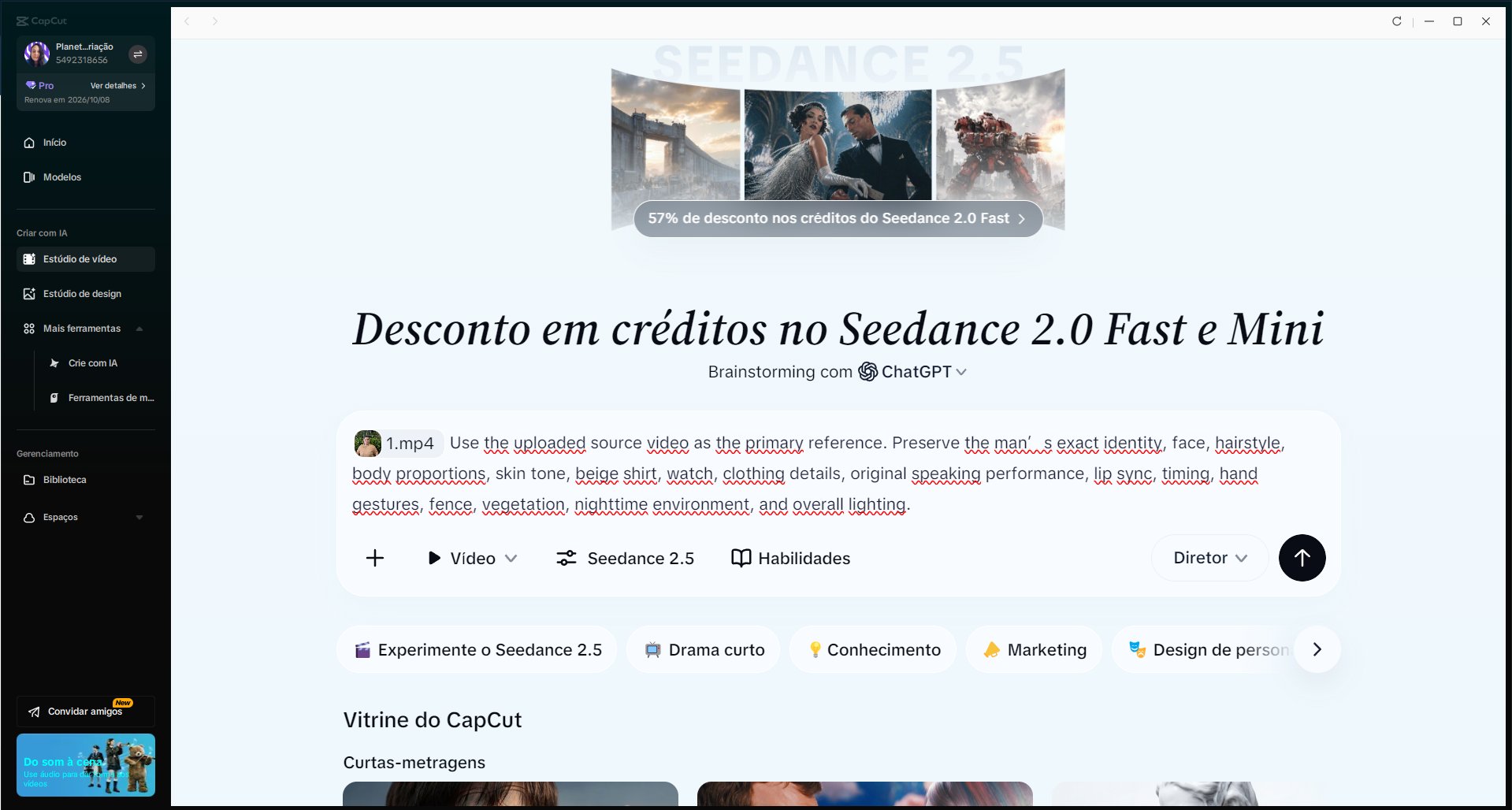
Use the uploaded source video as the primary reference. Preserve the subject’s exact identity, face, hairstyle, body proportions, clothing, accessories, original speaking performance, lip sync, timing, gestures, environment and lighting.

Create a cinematic MULTI-CAMERA STYLE video, not a single continuous shot. Simulate professional coverage with a visibly different camera angle approximately every 3 seconds.

0–3s: Camera A — eye-level medium shot, slightly off-center, subtle stabilized movement.

3–6s: Camera B — left three-quarter medium close-up, slight push-in.

6–9s: Camera C — low-angle hero medium shot, subtle lateral tracking with visible parallax.

9–12s: Camera D — right three-quarter angle, medium shot, gentle pull-back.

12–15s: Camera E — elevated wide shot, subtle crane-up revealing more of the environment.

Each segment must clearly change camera position, framing and perspective while preserving the same ongoing performance.

Natural blinking, eye tracking and facial micro-movements. No frozen gaze.

Do not alter identity, clothing, hands, face or environment. No warped limbs, extra fingers, face morphing, sudden teleportation, artificial zooms or visual glitches.
4Template 02 — Multicâmera mais agressiva
Use quando quiser edição com mais impacto.
Prompt
Use the source video as the absolute identity, performance and environment reference.

Create dynamic cinematic MULTI-CAMERA COVERAGE with a strong visual change every 2–3 seconds. This must feel edited from several professional cameras, not like one camera moving around continuously.

0–3s: frontal medium close-up, subtle push-in.
3–6s: dramatic left three-quarter angle, 50mm feel.
6–9s: low-angle wide shot with lateral parallax.
9–12s: right-side profile-leaning tracking shot.
12–15s: elevated wide-angle reveal with gentle crane-up.

Every camera change must introduce a clearly different viewpoint and composition.

Maintain exact identity, speech timing, lip sync, clothing, gestures, environment and lighting across all shots.

Allow natural eye movement appropriate to each camera position. The subject does not stare rigidly into the lens.

Professional cinematic coverage, realistic lens perspective, natural motion blur, believable camera inertia.

No continuous single-camera orbit. No repeated identical framing. No face changes, frozen eyes, body distortion, extra limbs, environmental redesign or surreal morphing.
5Template 03 — Orbit + multicâmera
Aqui o orbit aparece como apenas UMA das câmeras.
Prompt
Use the uploaded video as the primary reference. Preserve exact subject identity, clothing, speech performance, gestures, environment and lighting.

Create cinematic MULTI-CAMERA COVERAGE with different perspectives every 3 seconds.

0–3s: frontal medium shot, eye-level, subtle push-in.

3–6s: left three-quarter camera performing a smooth 60-degree partial orbit around the subject, producing strong natural parallax.

6–9s: low-angle hero shot from a clearly different camera position.

9–12s: right-side medium close-up with subtle lateral tracking.

12–15s: wide elevated drone-style shot, slowly rising and pulling backward.

The partial orbit is only one shot within the edit. Do not turn the entire video into one continuous orbit.

Maintain continuity of speech, gestures and timing across every camera change.

Natural eyes and facial micro-expressions. Strong depth and realistic perspective changes.

No identity drift, no frozen gaze, no warped hands, no artificial body rotation, no environment replacement, no sudden camera teleportation inside individual shots.
6Template 04 — Drone cinematográfico
Prompt
Use the source video as the primary reference. Preserve exact identity, appearance, clothing, action, environment, architecture and lighting.

Create cinematic drone-style coverage.

0–4s: medium-wide ground-level establishing shot.

4–8s: drone-style camera moves laterally while gradually rising, maintaining the subject as the visual anchor and creating strong foreground-background parallax.

8–12s: wide elevated three-quarter perspective, slow clockwise aerial arc around the subject.

12–15s: smooth pull-back and crane-up revealing more of the environment.

Camera movement must feel physically believable, stabilized and professionally operated. Smooth acceleration and deceleration, realistic perspective changes and natural motion blur.

Preserve subject scale and spatial continuity.

Do not distort the subject, change clothing or redesign visible environmental elements. Avoid impossible drone paths through solid objects, abrupt direction changes, excessive speed, floating-camera behavior or surreal geometry.
7Template 05 — Publicidade / produto
Prompt
Use the uploaded reference as the exact product and environment reference. Preserve product geometry, dimensions, branding, logo placement, label, typography, materials, colors and surface finish.

Create premium cinematic MULTI-CAMERA commercial coverage.

0–3s: hero three-quarter medium shot, slow controlled push-in.

3–6s: low-angle hero perspective emphasizing scale and silhouette.

6–9s: lateral tracking shot with strong foreground-background parallax.

9–12s: close detail shot highlighting material, texture and branding.

12–15s: wider final hero shot with subtle arc movement.

Each shot must have a visibly different camera position while maintaining identical product geometry and branding.

Professional advertising lighting, realistic reflections, controlled depth of field and precise camera motion.

Do not redesign the product. Do not modify the logo, text, package proportions, buttons, labels or materials. No invented branding, warped typography, melting geometry or duplicated components.
8Template 06 — Entrevista premium
Prompt
Use the uploaded source video as the performance reference. Preserve exact identity, facial features, speech, lip sync, timing, clothing, gestures and environment.

Transform the footage into professional cinematic interview coverage using multiple camera positions.

0–4s: Camera A — classic eye-level medium shot.
4–8s: Camera B — left three-quarter medium close-up with shallow depth of field.
8–12s: Camera C — tighter right three-quarter close-up emphasizing natural facial expressions.
12–15s: Camera D — wider environmental shot with subtle slow push-in.

Camera changes should feel like synchronized cameras recording the same interview.

Preserve continuous dialogue and gesture timing across all perspectives.

Eyes should behave naturally according to the camera angle and conversational context. Natural blinking and subtle facial micro-movements.

No frozen stare, identity drift, lip-sync loss, facial deformation, environment changes or excessive camera movement.
9O que o Seedance 2.5 consegue fazer
A documentação oficial informa suporte a vídeos de até 30 segundos em uma geração, narrativa com mudanças de planos, referência multimodal, controle por timestamps e edição de perspectiva e câmera.
Também pode utilizar múltiplas referências; a documentação atual cita até 30 imagens, 10 vídeos e 10 áudios por geração.
Isso torna especialmente úteis prompts como:
0–3s → câmera A
3–6s → câmera B
6–9s → câmera C
O próprio material oficial utiliza instruções organizadas temporalmente dessa forma.
10O que não deve ser tratado como garantido
Seedance pode tentar executar movimentos complexos, mas isso não significa perfeição em todos os casos. A ByteDance reconhece especificamente que ainda existe espaço para melhoria na plausibilidade física de movimentos complexos e na estabilidade de cenas envolvendo interações entre vários sujeitos.
Portanto, trate como menos confiável:
- movimentos corporais extremamente complexos + câmera extrema ao mesmo tempo;
- muitas pessoas interagindo fisicamente;
- objetos mudando de mão repetidamente;
- câmera atravessando espaços que não aparecem na referência;
- 360° completo quando o vídeo original mostra apenas uma direção;
- alteração simultânea de personagem, roupa, cenário, ação e câmera.
11Contradições que devem ser evitadas
Errado
single continuous take
no cuts
multi-camera
change camera every 3 seconds
Certo — multicâmera
Create multi-camera coverage with a visibly different perspective every 3 seconds.
Você está pedindo duas linguagens incompatíveis. Para plano-sequência:
Create one continuous cinematic take with no cuts.
12Não confunda ângulo com movimento
Ânguloonde a câmera está: frontal, profile, three-quarter, low angle, high angle, top-down, over-the-shoulder.
Enquadramentoquanto vemos: close-up, medium close-up, medium shot, full shot, wide shot.
Movimentoo que a câmera faz: push-in, pull-back, orbit, tracking, crane-up, pan, tilt, drone rise.
Um bom bloco combina os três:
left three-quarter medium shot with a slow lateral tracking movement
Isso é muito melhor do que apenas cinematic camera.
13Regra dos 3 segundos
Para vídeos como o seu, uma estrutura muito eficiente é: cada 3 segundos = nova câmera. Mas não troque apenas o movimento.
Ruim
Camera A frontal push-in
Camera B frontal pull-back
Camera C frontal zoom
Melhor
Camera A frontal
Camera B left 3/4
Camera C low angle
Camera D right profile
Camera E elevated wide
O primeiro continua parecendo praticamente a mesma câmera. O segundo cria mudança real de perspectiva.
14Como usar orbit corretamente
Orbit não precisa dominar o vídeo inteiro. Em multicâmera, use:
Camera C performs a partial 60–90 degree orbit.
Evite automaticamente:
360-degree orbit throughout the entire video
principalmente quando a referência original não mostra todo o ambiente. Quanto maior a rotação, mais conteúdo invisível o modelo precisa reconstruir.
15Como usar drone corretamente
Um movimento convincente costuma possuir: posição inicial → direção → altitude → distância → posição final.
The camera begins at eye level, moves laterally to the right, gradually rises above the subject and slowly pulls backward into an elevated wide shot.
Isso descreve uma trajetória. É melhor do que apenas epic drone movement.
16Olhos e rosto
Em vídeos de pessoa falando, acrescente:
Natural blinking, realistic eye tracking and subtle facial micro-movements.
Quando houver multicâmera:
The subject’s gaze behaves naturally according to each camera position.
Evite obrigar stare directly into the lens at all times quando a câmera está mudando muito de posição — isso pode produzir a aparência de olhos presos.
17Preservação de identidade
Para vídeos com referência
Preserve exact identity, facial structure, hairstyle, skin tone, body proportions, clothing and accessories.
Para fala
Preserve original speech performance, lip sync, timing and gestures.
Para ambiente
Preserve architecture, objects, vegetation, materials, lighting direction and time of day.
Para produtos
Preserve exact geometry, proportions, branding, typography, labels and materials.
18Não sobrecarregue cada plano
Em três segundos, evite pedir ao mesmo tempo: orbit 180° + zoom + crane-up + dolly-in + character spin + lighting change.
Escolha normalmente 1 ângulo, 1 enquadramento, 1 movimento principal:
low-angle medium shot with a subtle lateral tracking movement
Muito mais controlável.
19Negative constraints úteis
Use apenas os que fazem sentido para aquela cena:
No identity drift.
No frozen gaze.
No face morphing.
No warped hands.
No extra fingers.
No duplicated limbs.
No unstable clothing.
No environment redesign.
No invented objects.
No abrupt camera teleportation.
No surreal geometry.
No artificial zoom.
Não é necessário colocar vinte proibições em todos os prompts.
20Fórmula de cada câmera
Use:
[TEMPO]: Camera [LETRA] — [ÂNGULO], [ENQUADRAMENTO], [MOVIMENTO], [EFEITO VISUAL].
Exemplo:
6–9s: Camera C — low-angle medium shot, slow lateral tracking to the right, creating strong natural parallax between the subject, fence and background vegetation.
Essa é uma das estruturas mais seguras para direção de câmera.
21Checklist antes de gerar
- Estou pedindo single take ou multicâmera?
- Existe alguma instrução contradizendo isso?
- Cada câmera realmente ocupa uma posição diferente?
- Cada trecho possui tempo definido?
- Especifiquei o que deve ser preservado?
- Coloquei apenas um movimento principal por plano?
- O modelo precisará inventar áreas demais fora da referência?
- A mudança de câmera é necessária ou estou apenas acumulando efeitos?
- Se houver fala, pedi para manter performance e lip sync?
- Se houver pessoa, protegi identidade, rosto, mãos e olhos?
Se as dez respostas estiverem claras, o prompt está pronto.
22Fórmula ultrarrápida
Quando estiver com pressa, use:
REFERENCE:
Preserve [identity / product / environment / performance].

FORMAT:
Create [MULTI-CAMERA / SINGLE TAKE / DRONE / ORBIT / TRACKING].

TIMELINE:
0–3s: [camera]
3–6s: [camera]
6–9s: [camera]
9–12s: [camera]

CONTINUITY:
Preserve the same subject, action, environment and temporal continuity.

RESTRICTIONS:
No [main expected errors].
Regra de ouro
Primeiro diga que tipo de vídeo é.
Depois diga quando cada câmera aparece.
Depois diga de onde ela filma.
Depois diga como ela se move.
Por último diga o que não pode mudar.
Não comece pelo efeito. Comece pela direção.
Perguntas frequentes
Onde fica o Seedance 2.5 no CapCut?
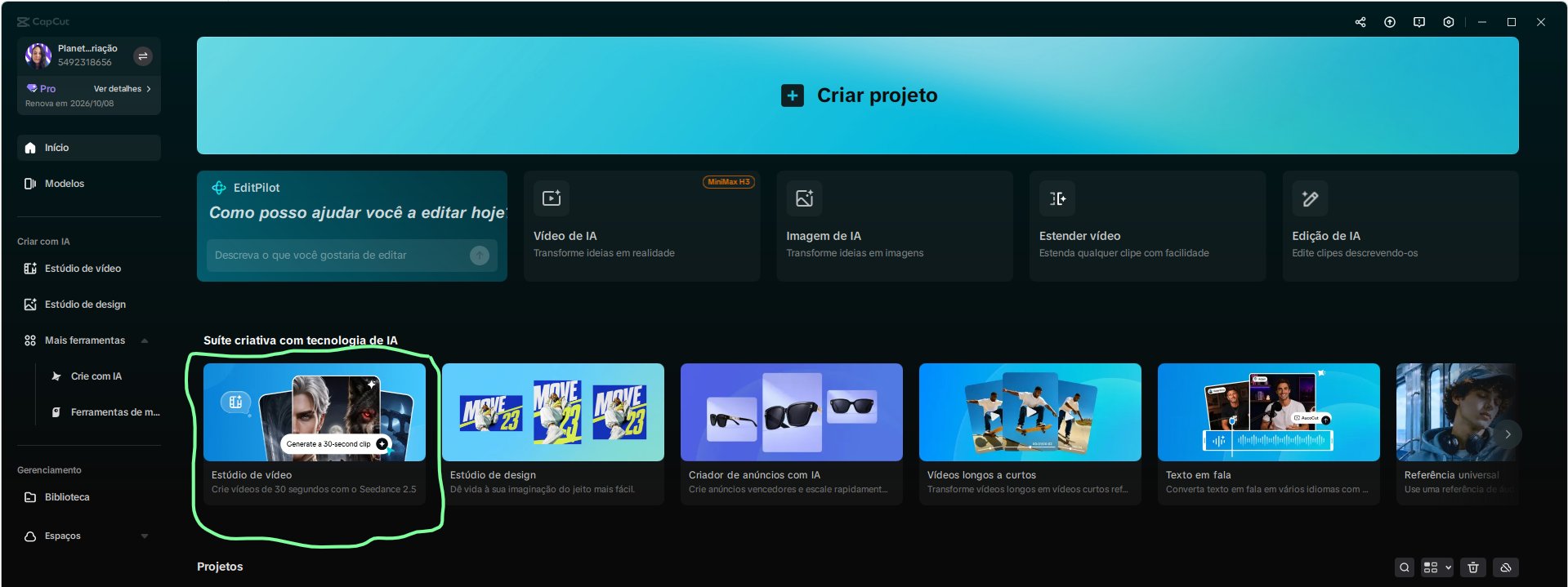
Na tela inicial do CapCut, dentro do bloco Suíte criativa com tecnologia de IA, no card Estúdio de vídeo.
O que é um vídeo multicâmera com IA?
É um vídeo que parece gravado por várias câmeras: a cada trecho (por exemplo, a cada 3 segundos) o ângulo, o enquadramento e a perspectiva mudam, mantendo a mesma pessoa, fala e cenário.
Qual a estrutura de um bom prompt de câmera?
Preserve, Format, Timeline, Camera, Continuity e Restrictions: o que não pode mudar, o tipo de vídeo, o que acontece em cada trecho, ângulo e movimento, o que deve continuar igual e os erros a evitar.
Qual a diferença entre ângulo, enquadramento e movimento?
Ângulo é de onde a câmera filma (frontal, perfil, low angle). Enquadramento é quanto aparece (close-up, plano médio, plano aberto). Movimento é o que a câmera faz (push-in, orbit, tracking, drone).
Quanto tempo de vídeo o Seedance 2.5 gera?
A documentação oficial informa suporte a vídeos de até 30 segundos em uma geração.